
Resource · Explainer
Payment reconciliation without the month-end scramble
Payment reconciliation is the work of proving that the money in your bank account matches the sales you made, once processing fees, reserves, refunds, and chargebacks are accounted for. For a high-volume high-risk merchant it's rarely simple, but with the right data and a clean export into accounting, it stops being a month-end scramble and becomes a continuous, rule-driven match.
What reconciliation actually means
Reconciliation answers a deceptively simple question: did we actually receive the money we earned? The reason it's hard is that a day of sales doesn't arrive as a tidy matching deposit. It shows up days later as a single net figure, gross sales minus processing fees, minus any reserve held back, adjusted for refunds and any chargebacks that hit in the meantime. Reconciliation is the process of decomposing that net deposit back into its parts and tying each one to the sales and adjustments that produced it.
Authorization vs. settlement vs. deposit
Three different moments get casually called “the payment,” and conflating them is where reconciliation goes wrong. Authorization is when the card is approved at checkout, money is promised, not moved. Settlement is when the batch is submitted and the transaction is finalized with the networks. Deposit (funding) is when the net amount actually lands in your bank, typically a day or more after settlement. A sale authorized today might settle tonight and fund two days later, net of fees, so the deposit you're reconciling reflects sales from several different days, not one. Getting the timing model right is the foundation; everything else is matching within it.
Fees, reserves, and disputes in the match
Three elements turn a clean match into real work. Fees are deducted per transaction or in aggregate, so the deposit is always less than gross sales by an amount you have to be able to reconstruct. Reserves are the trickiest: a rolling reserve holds back a percentage of each batch and releases older holds on a schedule, so a single deposit reflects both money held from current sales and money released from past ones. And chargebacks claw funds back after a sale was already booked, creating an adjustment you must tie to the original transaction. High-risk accounts have more reserve activity and more disputes than low-risk ones, which is exactly why payments-side reconciliation matters more here, not less.
Automating it at volume
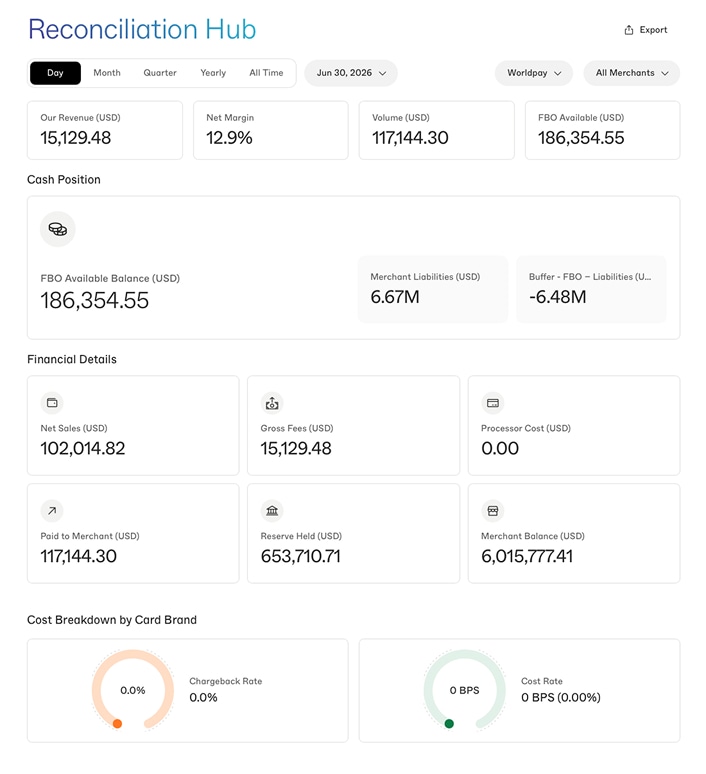
By hand, this is doable at a few transactions a day and impossible at a few thousand. The way through is to stop matching manually and start matching on rules: pull structured transaction, fee, reserve, and dispute data from the processor, and let defined rules tie each deposit line to its sources. The merchant portal holds that underlying data in real time and exports it in a structured form, so reconciliation becomes a scheduled, rule-driven process rather than a spreadsheet archaeology project at month-end. The goal is continuous reconciliation, small, automatic, and current, instead of a quarterly reckoning.
Exports to your accounting stack
Reconciliation isn't finished until the numbers live in your books. The portal's exports are built to feed accounting tools, QuickBooks, Xero, NetSuite, through our integrations, so deposits, fees, reserves, and adjustments reconcile against your ledger continuously. That's the difference between a processor that hands you a PDF statement to retype and one whose data flows into the system you actually keep your books in. For a high-volume merchant, that flow is what keeps finance ahead of the month rather than buried by it.
If you want payments on an account whose data is built to reconcile cleanly, itemized fees, transparent reserves, exportable disputes, get approved
FAQ
Payment reconciliation FAQ
What is payment reconciliation?
Payment reconciliation is the process of matching the money that actually landed in your bank account to the sales you made, accounting for the gap created by processing fees, rolling reserves, refunds, and chargebacks along the way. It sounds like it should be one-to-one, but it never is: a batch of sales arrives as a single net deposit days later, minus fees, minus any held reserve, adjusted for disputes. Reconciliation is how you prove the deposit is correct and book it properly.
Why is reconciliation harder for high-volume merchants?
Volume multiplies every small discrepancy. At a few transactions a day you can eyeball the deposit; at thousands, the timing gaps between authorization, settlement, and deposit, the per-transaction fees, the reserve holds and releases, and the steady trickle of refunds and disputes turn into a reconciliation problem that can't be done by hand. High-risk merchants feel it more sharply because reserves and disputes, the two messiest elements to reconcile, are exactly the parts a high-risk account has more of.
Can I automate payment reconciliation?
Largely, yes. The path is to pull structured transaction, fee, reserve, and dispute data from your processor in real time and export it into your accounting system on a schedule, so the matching is rule-driven rather than manual. The portal holds that underlying data and exports it for exactly this purpose. Full automation usually means connecting those exports to an accounting tool, QuickBooks, Xero, NetSuite, through integrations, so deposits, fees, and adjustments reconcile against your books continuously instead of in a month-end crunch.
How do reserves and chargebacks affect reconciliation?
They're the two elements that make payments reconciliation genuinely tricky. A rolling reserve holds back a percentage of each batch and releases it later, so today's deposit reflects both a hold on current sales and a release of older ones, two moving parts to track. Chargebacks claw funds back after the original sale was already booked, creating an adjustment you have to tie to the right transaction. Clean reconciliation depends on having both of these itemized in your data, which is why the export needs reserve and dispute detail, not just gross sales.
Data that reconciles instead of fighting you.
Itemized fees, transparent reserves, exportable dispute detail, the inputs clean reconciliation needs, on an account built for your category.